
Quick Answer
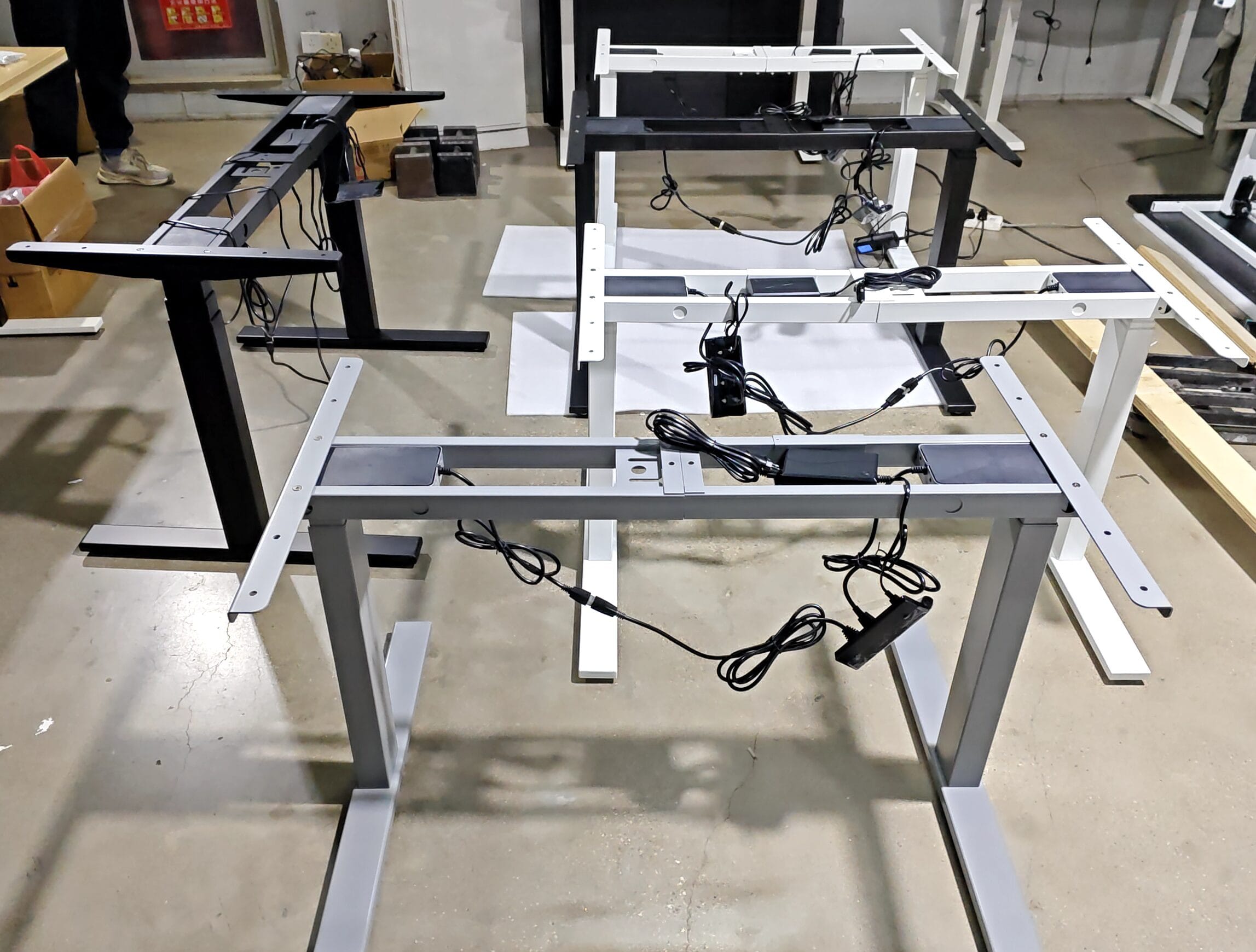
Choose a single-motor standing desk when budget decides the project and the workstation fits its load and height range. Choose a dual-motor standing desk for heavier setups, a wider height range and a longer warranty. B&H Ergonomics, an electric standing desk frame manufacturer in Ningbo, China, makes both types. The single-motor BH-S22RS has a rated dynamic load of 80 kg, with a reinforced version up to 100 kg. It lifts at 25 mm/s and carries a 1-year warranty on the complete frame. The dual-motor BH-D23RS has a rated dynamic load of 130 kg and lifts at 32 mm/s. Its warranty covers the frame for 5 years and the motors, control boxes and hand controls for 3 years. BH-S22RS starts at 100 BH-S22RS workstations. BH-D23RS starts at 40 workstations, counted together with BH-T33RS and BH-Q43RS, so a 60-workstation office project fits BH-D23RS.
Last Updated: November 18, 2026 | Author: William | Estimated Reading Time: 8 minutes
BH-S22RS vs BH-D23RS: Compare the Actual Frames
The comparison below uses the standard specifications published for each model. Heights are measured at the frame. The finished-height row adds the same 25 mm desktop to both models.
| Specification | BH-S22RS | BH-D23RS |
|---|---|---|
| Motors | One | Two |
| Legs and column stages | Two legs, two-stage columns | Two legs, three-stage columns |
| Standard frame height | 720–1180 mm | 600–1250 mm |
| Finished height with a 25 mm desktop | 745–1205 mm | 625–1275 mm |
| Standard vertical travel | 460 mm | 650 mm |
| Optional frame height ranges | 700–1200 mm | 575–1225 mm, 625–1275 mm |
| Frame width range | 1000–1500 mm | 1050–1800 mm |
| Rated dynamic load (desktop included) | 80 kg standard; reinforced version up to 100 kg | 130 kg |
| Listed lifting speed (measured without load) | 25 mm/s | 32 mm/s |
| Warranty | 1 year on the complete frame, including the motor, controller and other electronic components | 5 years on the frame; 3 years on motors, control boxes and hand controls |
| Project quantity | From 100 workstations of BH-S22RS | From 40 workstations in a mixed BH-D23RS, BH-T33RS and BH-Q43RS project |
The rated dynamic load is the weight the frame lifts. Count the desktop and everything that moves with it: monitors, monitor arms, a CPU holder and any under-desk storage. The listed speeds are measured without load, and both frames lift at nearly the same speed at full rated load.
The height ranges come from each model’s column construction, not from the second motor by itself. Put the selected height range in the order so the quoted frame matches the height plan.
Order Thresholds: 100 S22RS Workstations or a 40-Workstation Mixed Project
The two models are counted under different rules, so plan the quantity by model.
- BH-S22RS is counted on its own. When BH-S22RS is in the order, this model is reviewed from 100 workstations. One BH-S22RS set equals one workstation.
- BH-D23RS is counted together with BH-T33RS and BH-Q43RS. A mixed project is reviewed from a total of 40 workstations. One BH-D23RS set is one workstation, one BH-T33RS set is one L-shaped workstation, and one BH-Q43RS set is two facing workstations.
For example, 24 BH-D23RS sets, 6 BH-T33RS sets and 5 BH-Q43RS sets make 24 + 6 + 10 = 40 workstations.
When a project uses both structures, the BH-S22RS positions count toward their own 100-workstation threshold. The BH-D23RS, BH-T33RS and BH-Q43RS positions count toward the 40-workstation total. For 40 to 99 single workstations, BH-D23RS is the frame that fits the quantity, and it can be combined with L-shaped or facing desks in the same order. A 60-workstation project, for example, can run as 60 BH-D23RS sets or as BH-D23RS mixed with BH-T33RS and BH-Q43RS to the same total.
Where the Lower Price Comes From: Beams and Controls
Single-Beam and Double-Beam Frames
A single crossbeam is the most common layout on budget single-motor desks. B&H Ergonomics can supply a single-motor frame with a single beam or a double beam, depending on the project budget. Ask which construction is included in a BH-S22RS quotation.
The beams are structural members. The drive shaft does a different job: it carries rotation from the motor to both lifting columns. When reviewing a drawing, count the supporting beams separately from the drive shaft.
If two single-motor quotations have different prices, compare their beam layouts before treating them as the same frame. Record the chosen layout in the purchase specification and check that version on the sample.
Controls Integrated into the Handset or a Separate Control Box
The handset is the panel the user presses to raise or lower the desk. Many current single-motor designs build the control electronics into the handset. This removes the cost of a separate control box and keeps the frame within a tight budget.
BH-D23RS uses a separate control box and handset. The handset is the user interface, and the control box coordinates the two motors. When comparing quotations, ask each supplier to list the exact control box and handset models.
| Quotation detail | What to record |
|---|---|
| Structural beams | Single-beam or double-beam frame, matched to the drawing and sample |
| Control arrangement | Controls built into the handset, or a separate control box and handset |
| User functions | The memory positions and other functions included in the quoted version |
| Replacement components | The matching handset and control box models, plus the warranty terms for each |
Ask for the functions you need by name. A memory-button layout does not tell you the control architecture or which replacement parts fit it.
Plan the Drive-Shaft Step in Assembly
On BH-S22RS, one motor drives both lifting columns through a drive shaft that runs between the legs. The installer connects that shaft as part of assembling the frame. On BH-D23RS, each leg has its own motor, and the control box keeps the two legs in step. For the underlying drive arrangements, see how a standing desk mechanism works.
B&H Ergonomics frames ship ready for assembly by the buyer’s installer or fit-out team. For a project order, have that team assemble one sample with the supplied instructions before setting the rollout process. Time the assembly per workstation and mark the drive-shaft steps on BH-S22RS. Keep the approved instructions with the team that assembles later batches. This turns assembly effort into a figure you can compare across the two models.
Assembly can also be checked before the frames leave the factory. On a 400-set BH-D23RS order for Goodmans, a MillerKnoll Certified Dealer, the pre-shipment inspection combined a five-unit assembly check, recorded as passed, with a 50-unit AQL sample under ISO 2859-1. The Goodmans OEM standing desk frame case study shows the inspection results and the parts replaced before shipment.
Height Range and Stability at the Same Working Height
Start With the Lowest Seated Position
With the same 25 mm desktop, the standard BH-S22RS starts at a finished height of 745 mm and the standard BH-D23RS starts at 625 mm, a difference of 120 mm. At the top, the finished heights are 1205 mm and 1275 mm, so BH-D23RS reaches another 70 mm.
Match the range to the lowest seated height your users need:
- Seated height from 745 mm: the standard BH-S22RS covers it.
- Seated height from 725 mm: the BH-S22RS 700–1200 mm option gives a finished range of 725–1225 mm.
- Seated height below 725 mm: the standard BH-D23RS starts at 625 mm, and its 575–1225 mm option starts at 600 mm.
For the standing position, measure your working height with the keyboard and usual footwear, and add a standing mat if one is part of the setup. Record the required low and high positions, then compare them with the frame range on the quotation.
Compare Stability at the Same Working Height
Judge stability on the assembled workstation at the height where it will be used. Give both samples the same desktop size and thickness, equipment placement and floor conditions. Raise both to the same working height, then compare front-to-back and side-to-side movement during the intended tasks. Include the monitor arm if one is planned, because users notice screen movement more than frame movement.
Record the beam layout of each sample with the acceptance decision. If a quotation changes from a double-beam to a single-beam frame, repeat the check on that build.
Is the Dual-Motor Upgrade Worth It for Your Project?
The dual-motor frame is the better fit when the project needs more load, a lower seated position, a longer warranty or a quantity below 100 single workstations. BH-S22RS remains the economical frame for large, repeated rows of single workstations within its load and height range.
| Your situation | Selection guidance |
|---|---|
| Fixed budget, 100 or more single workstations | BH-S22RS, after checking height range and moving load |
| Moving load between 80 kg and 100 kg | Reinforced BH-S22RS, or BH-D23RS at 130 kg |
| Moving load above 100 kg | BH-D23RS, rated at 130 kg |
| Planned use of five years or longer | BH-D23RS, with 5 years on the frame and 3 years on motors, control boxes and hand controls |
| 40 to 99 workstations, or single desks mixed with L-shaped or facing desks | BH-D23RS with BH-T33RS or BH-Q43RS, counted toward the 40-workstation total |
| Lowest seated height below 725 mm | Standard BH-D23RS or its 575–1225 mm option |
| Two single-motor offers at different prices | Compare beam layout and control arrangement line by line |
| A team assembling many workstations | Assemble one sample first and time it |
FAQ
Can a 60-workstation office project use BH-S22RS?
BH-S22RS starts at 100 workstations of this model, so a 60-workstation project is planned on BH-D23RS. BH-D23RS starts at 40 workstations, counted together with BH-T33RS and BH-Q43RS.
Does the rated dynamic load include the desktop?
Yes. The rated dynamic load covers the desktop and everything that moves with it, including monitors, monitor arms, a CPU holder and under-desk storage.
How do BH-T33RS and BH-Q43RS count toward the 40-workstation total?
One BH-T33RS set counts as one L-shaped workstation. One BH-Q43RS set counts as two facing workstations, so 20 BH-Q43RS sets make 40 workstations.
Next Step
Compare quotations with the same desktop, finish, accessories and user functions. List beam layout and control arrangement separately so any cost reduction is visible. Add the selected height range and sample acceptance requirements to the order.
Review the full specifications on the BH-S22RS single-motor frame and BH-D23RS dual-motor frame pages, or compare every model on the electric standing desk frames page. For a configuration-specific quote, send the workstation quantity by model, the desktop size and thickness, the equipment load, the required low and high positions, and the project destination.