
Quick Answer
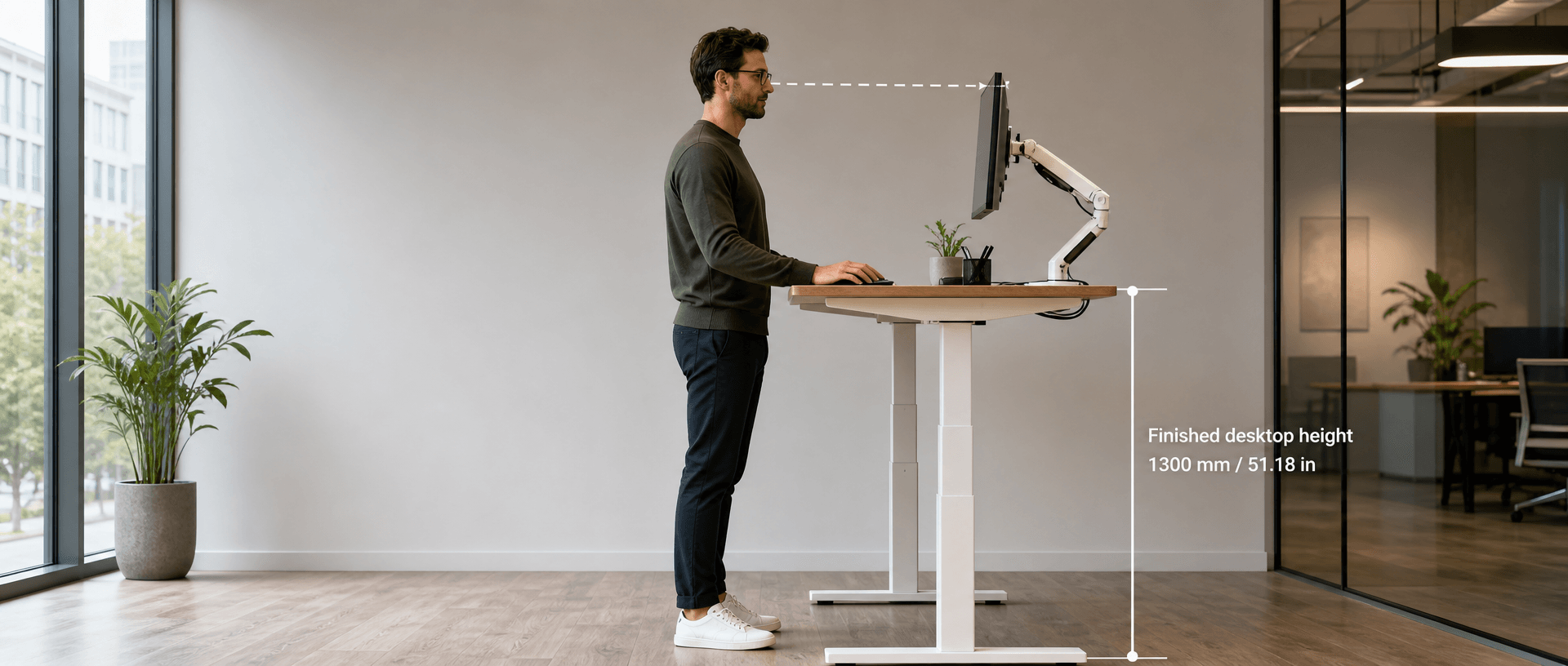
A standing desk for tall people should reach the user’s comfortable working height after the desktop is installed. A maximum finished height of 1300 mm (51.18 in) is a useful candidate for someone around 195 cm (6 ft 4.8 in) tall, but it is not a universal fit guarantee. For the B&H Ergonomics BH-D23RS, the 625–1275 mm (24.61–50.20 in) frame option reaches 650–1300 mm (25.59–51.18 in) with a 25 mm (0.98 in) desktop. Check the seated minimum and test the complete workstation before selecting that configuration.
Last Updated: September 7, 2026 | Author: William | Estimated Reading Time: 6 minutes
Is a 1300 mm Standing Desk High Enough for You?
Start with your required desktop height, then compare it with the desk’s finished adjustment range. Your overall height helps narrow the shortlist; your arm proportions, footwear and keyboard setup determine the working position.
The Canadian Centre for Occupational Health and Safety’s sit-stand desk guidance recommends setting the standing work platform approximately at elbow height. Your shoulders should remain relaxed, with your upper arms naturally at your sides and your wrists aligned with your forearms.
For an initial estimate, the Omni desk-height calculator gives the following standing desk ranges when height is entered wearing shoes:
| User height, wearing shoes | Estimated standing desktop range | What a 1300 mm (51.18 in) maximum means |
|---|---|---|
| 195 cm (6 ft 4.8 in) | 1170–1270 mm (46.06–50.00 in) | Covers the estimated range; worth testing as a candidate |
| 200 cm (6 ft 6.7 in) | 1200–1305 mm (47.24–51.38 in) | Does not cover the entire estimate; the upper end is 5 mm (0.20 in) higher |
These are estimates from a secondary calculator, not individual measurements or a certified fit range. In particular, the difference at 200 cm does not mean every person of that height needs the upper endpoint. It means that promising a fit for everyone up to 200 cm would be unjustified.
1300 mm (51.18 in) is the available maximum, not the setting every tall user should choose. If your comfortable desktop position is lower, use that position. If it is higher, select a configuration that actually covers it. Our guide to finding your optimal standing desk height explains how to establish that position with your own keyboard and working setup.
Compare Frame Height With Finished Desktop Height
A frame specification and a complete-desk specification can describe different measuring points. Before comparing two products, ask whether the quoted height ends at the desktop support or the top surface of the installed desktop.
For the BH-D23RS options below, all quoted frame ranges exclude the desktop. Add the actual desktop thickness to both endpoints:
Finished desktop height = frame height + desktop thickness.
| BH-D23RS frame-only range | Desktop thickness in this example | Finished desktop range |
|---|---|---|
| 600–1250 mm (23.62–49.21 in) | 25 mm (0.98 in) | 625–1275 mm (24.61–50.20 in) |
| 575–1225 mm (22.64–48.23 in) | 25 mm (0.98 in) | 600–1250 mm (23.62–49.21 in) |
| 625–1275 mm (24.61–50.20 in) | 25 mm (0.98 in) | 650–1300 mm (25.59–51.18 in) |
In B&H Ergonomics’ ordering experience, the first two frame ranges are common in US orders, while the 625–1275 mm (24.61–50.20 in) option is common in European orders. These are B&H order observations, rather than market-wide statistics. BH-D23RS is available with these height options, so the model name alone is not a complete height specification.
A higher maximum also raises the minimum
All three configurations have 650 mm (25.59 in) of travel. The higher option shifts the adjustment range upward; it does not provide more travel.
For example, a user who needs a finished standing height of 1290 mm (50.79 in) would exceed the two lower options with the example desktop. The highest option covers that standing position, but its 650 mm (25.59 in) seated minimum still needs checking. If a shared workstation must also reach 620 mm (24.41 in), none of these three configurations covers both requirements with that desktop.
When comparing B&H Ergonomics standing desk frame options, specify the frame-only range, desktop thickness and required finished range together. Keep those dimensions on the quotation and sample approval record so a different height variant is not substituted under the same model name.
Why Dutch Desk Requirements Deserve a Closer Look
Dutch height data helps explain why upper adjustment limits deserve attention. According to Statistics Netherlands (CBS), men born in 2001 averaged 182.9 cm (about 6 ft) at age 19, while women in that cohort averaged 169.3 cm (about 5 ft 6.7 in). These figures describe that birth cohort at age 19, rather than the current average for every Dutch adult.
A population average provides context for purchasing; it cannot establish the desk setting for an individual employee or cover the tallest people in a team.
Is 1300 mm a Dutch legal requirement?
Do not treat a supplier’s reference to a Dutch ergonomic guideline as proof of a universal legal height requirement. The relevant document is NPR 1813:2025, listed by NEN, a Dutch practice guideline covering office furniture and workstation accessories. The 2025 edition replaces the 2016 edition.
NEN’s explanation of standards and practice guidelines states that standards are generally voluntary, although legislation can refer to them, and describes an NPR as an informative practical guideline. That distinction matters when a procurement brief says “NPR 1813 required.” Ask which edition and requirements the contract incorporates, and obtain evidence for the proposed complete configuration.
A finished maximum of 1300 mm (51.18 in) establishes a dimension. It does not, by itself, establish full NPR 1813 conformity. The current edition’s complete dimensional provisions have not been verified here, so this height comparison should not be used as a declaration of compliance for BH-D23RS.
Check the Desk at Your Actual Working Height
A desk that reaches the right number still needs to work with your equipment. Request a sample with the proposed desktop, frame variant, monitor supports and intended equipment load.
Test movement where you will work
Set the sample to your required standing position. Type, use the mouse and observe the screen and desktop for movement that interferes with the task. Record the desktop dimensions, equipment arrangement and height used for the check; those details let the supplier investigate a problem or reproduce the configuration.
A maximum height specification cannot establish stability at that height. This comparison does not claim that BH-D23RS has passed a particular high-position stability test. For a project with a formal performance requirement, request a relevant test report as well as checking the configured sample.
Check the screen, reach and cables
Confirm that the monitor support reaches the intended viewing position while the keyboard remains at a comfortable operating height. Raising the whole desk to compensate for a monitor that sits too low changes the keyboard position as well.
Use the planned footwear and standing mat during the fit check. Keep the mouse and frequently used equipment within comfortable reach, then move the desk through the intended seated and standing settings while checking cable slack and surrounding clearance. The standing desk ergonomics guide covers the wider workstation setup.
Use a Tall-User Desk Acceptance Checklist
Complete one record for each proposed configuration. For a shared desk, include the users who need its lowest seated and highest standing settings. Record the reviewer, date and configuration revision; this is a purchasing acceptance record, not standards certification.
| Acceptance item | Record before approval | Decision if the check fails |
|---|---|---|
| Exact frame variant | BH-D23RS plus the selected frame-only range in mm and inches | Correct the quotation or sample specification |
| Installed desktop | Actual thickness, width and depth | Recalculate finished height and repeat the sample check |
| Finished height endpoints | Measured lowest and highest top-surface positions | Resolve any difference from the agreed specification |
| Standing fit | Required desktop height with the user’s keyboard, footwear and mat | Choose a range that covers the measured position |
| Seated fit | Required seated setting for each relevant user | Select another range or revise the workstation allocation |
| Movement during work | Observations at the intended height with the planned equipment | Request a configuration change and retest |
| Screen and reach | Monitor position, keyboard and mouse access | Adjust compatible accessories and retest |
| Travel clearance | Cable slack and clearance through intended settings | Correct routing or layout before acceptance |
| Contract requirements | Named standard, edition, applicable requirements and supporting documents, if specified | Resolve missing evidence before procurement approval |
| Final decision | Accept this configuration, revise and retest, or select another configuration | Keep the approved dimensions and equipment list with the order |