
Quick Answer
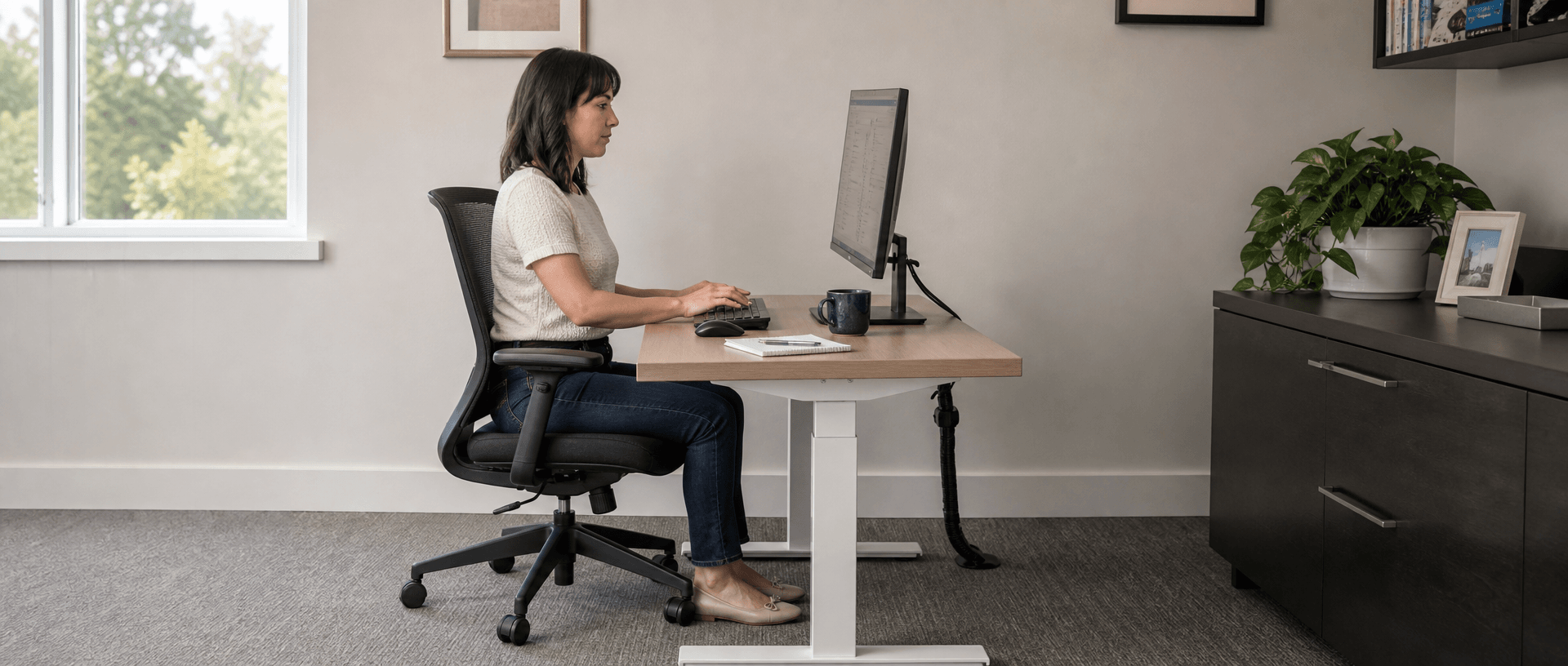
A standing desk for short person needs to work with the chair and input devices at its seated setting. Check whether you can sit against the backrest, support your feet, reach the keyboard without leaning and leave room for your thighs. Raising the chair with a footrest can make an existing desk usable. If it cannot, consider a lower work surface—but check seat depth and obstructions first. A lower desk will not shorten an oversized seat or move an armrest that blocks your approach.
Last Updated: September 9, 2026 | Author: William | Estimated Reading Time: 5 minutes
Start With the Problem You Actually Notice
Shorter customers contacting B&H Ergonomics often describe having to lift their shoulders to type at an ordinary desk. That is a useful starting observation, but it does not identify every part of the problem. The keyboard may be too high, the armrests may hold the shoulders up, or the chair may be unable to move close enough.
Use the following checks with your normal keyboard and mouse. Change one setting at a time and try the same task again, so you can tell which adjustment helps.
Can You Use the Backrest Without Pressure Behind Your Knees?
Sit back rather than perching on the front edge of the cushion. Check whether the backrest supports you while the front of the seat stays clear of the backs of your knees.
If the cushion reaches too far forward, use the chair’s seat-depth adjustment, following its instructions. If the available adjustment still leaves contact behind the knees, try a chair with a shorter seat. Lowering the worktop does not change this front-to-back dimension.
OSHA’s chair guidance on seat depth and armrests explains that a seat pan that is too long can press on the knee area of shorter users and reduce back support. It recommends depth adjustment that supports most of the thigh while leaving the back of the knee clear of the front edge.
A footrest provides support below the feet; it should not require you to slide forward and abandon the backrest to reach it. Assess both supports together. Avoid choosing a chair solely because its advertised seat-height range looks low enough.
Can You Reach the Keyboard Without Leaning Forward?
Check the Armrests Before Changing the Worktop
With your shoulders relaxed, bring the chair toward the keyboard. If the armrests meet the front edge or underside first, they may be keeping you too far away.
Adjust their height or position where the chair permits. Do not raise the desk solely to let the armrests pass underneath if that makes typing too high again. If they cannot be positioned appropriately, assess another chair or a manufacturer-permitted armrest change.
The OSHA chair guidance also identifies overly high armrests as a cause of raised shoulders, and oversized or poorly positioned armrests as an obstacle to getting close to the keyboard. Test keyboard use after each adjustment; an armrest setting that feels comfortable away from the desk may still obstruct it.
Check the Keyboard and Mouse as a Pair
Place the mouse beside the keyboard within comfortable reach. Moving the keyboard closer while leaving the mouse farther away solves only part of the task.
If you use a keyboard tray, check that it accommodates both devices and does not bring its underside against your thighs. A tray can lower the input surface, but its brackets and platform also occupy space beneath the desk. Try the installed arrangement before treating it as a solution.
Should You Raise the Chair or Lower the Desk?
If the seat fits but the keyboard remains too high, raising the chair is a practical option. Add a footrest when the floor no longer supports your feet. OSHA’s desk and work-surface guidance explicitly recommends this approach when the work surface cannot be lowered.
Keep that arrangement if you can type with relaxed shoulders, use the backrest and maintain supported feet without crowding your legs. Recheck screen position after adjusting the chair.
If those conditions cannot be achieved together, assess a lower work surface. Establish the seated position you want to retain before selecting it, rather than copying a raised seat setting used only to compensate for the old furniture. Our seated desk-height fit guide explains how to record the required desktop position with your actual input devices.
Does the Low Setting Leave Usable Space Underneath?
The top surface and the space below it answer different questions. The first determines where your equipment sits. The second determines whether your legs and chair can occupy the working position.
Inspect the places your thighs, knees and armrests actually enter. A drawer near the front, a keyboard-tray bracket or a rail can be the first obstruction. A clear area elsewhere beneath the board does not make that obstruction disappear.
Lowering an adjustable desk also lowers its attached underside components toward your legs. Follow the operating instructions, keep the movement path clear and check for interference before entering the seated position. Do not use your knees or chair as a stop while lowering.
If an accessory causes the problem, assess its placement or compatibility before rejecting the whole desk. If a fixed structural member prevents the intended posture, request another compatible configuration rather than altering the structure yourself. No universal clearance dimension can substitute for trying the proposed chair and accessories together.
A B&H Low-Range Configuration to Check
B&H Ergonomics offers the BH-D23RS 575–1225 mm frame-only option for shorter customers, commonly in its US-market orders for those customers. With a 25 mm desktop, its calculated finished range is 600–1250 mm (23.62–49.21 inches). This is our configuration and customer experience, not a US height standard or a promise of fit for everyone below a particular body height.
For a hypothetical seated desktop requirement of 620 mm, that assembly reaches the position; for 580 mm, it cannot go low enough. The chair, reach and underside checks above still apply when the number is within range.
Use the same chair, keyboard and accessories when trying the proposed assembly. Record where contact occurs and which adjustment resolves it; do not approve a substitution that reintroduces that obstruction.
When reviewing B&H Ergonomics standing desk frame options, specify the exact height variant and proposed board. Verify your standing position separately against the upper endpoint. Use the assembled configuration with your intended chair and accessories before approving it for repeated office use.
Match the Adjustment to the Remaining Problem
| What you notice | Inspect first | Adjustment to test |
|---|---|---|
| Shoulders rise while typing | Keyboard position and armrest height | Adjust armrests; then assess chair elevation with foot support or a lower input surface |
| Feet hang after raising the seat | Floor or footrest support while using the backrest | Reposition or adjust a stable footrest; reassess seat height if support remains inadequate |
| You slide forward to avoid pressure behind the knees | Seat depth and front-edge contact | Shorten the adjustable seat pan or try a shorter seat |
| You lean forward to reach the keys | Armrest interference and device placement | Clear the permitted approach and bring keyboard and mouse within reach |
| Thighs or knees meet the underside | The specific rail, drawer or tray causing contact | Review the accessory arrangement or choose a compatible configuration |
| Typing remains too high at the lowest setting | Installed top height and actual keyboard position | Assess a genuinely lower assembly or compatible input-surface solution |
Record the unresolved problem and the adjustment that worked. For a shared workstation, repeat the checks with each intended user. Choose the setup that resolves the actual mismatch rather than the one with the lowest advertised number.